
d-p-why?
My main machine has been running Debian Testing for at least a decade. It has
survived two migrations onto different hardware, carrying its /etc and home
directory like geological strata. It runs Xfce as desktop environment and
mostly GTK applications, except for a few Qt applications sprinkled in. A while
ago I noticed that one application, sqlitebrowser
rendered funny:
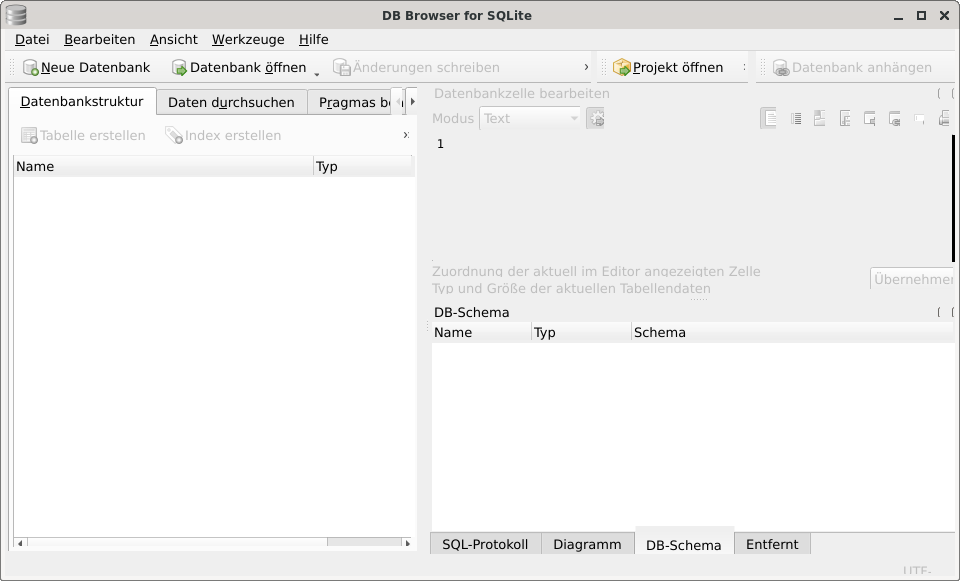
Look at the “Projekt öffnen >” toolbar button: the “>” is clipped so it looks like a colon. The “Übernehmen” button on the right is missing its bottom border and its last letter. The text “Typ und Größe der aktuellen Tabellendaten” has its descenders sliced off; the “y” and “p” are flat at the bottom. And the scrollbar in the lower left is only half there.
I didn’t think too much of it, as these kinds of things tend to happen when you run “Testing”, and usually they sort themselves out sooner or later. But this time it didn’t. And worse, I found that other Qt applications suffered from a similar issue. Here is QElectroTech:
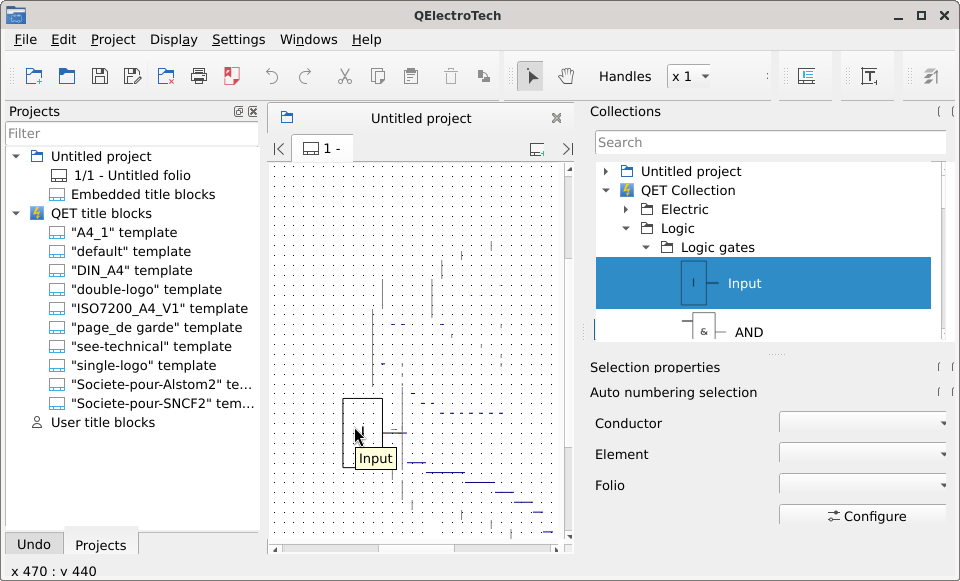
Same clipped buttons, same incomplete scrollbars. Plus dark smudges and trails on the drawing canvas where previous content was not properly cleared.
Consulting with a friend, I learned that on a (comparatively) fresh Debian install, the same application in the same Xfce environment rendered without issues. Well, that explains why no fix ever trickled down to me: Most likely not an upstream issue but rather a result of some obscure, arcane, eldritch piece of accumulated misconfiguration on my machine. And at long last, I finally set out to figure out what was going on.
Ruling things out
My system runs three (yes, I am one of those people) identical 1920x1200 monitors on an Nvidia GTX 1080. No HiDPI, no fractional scaling, no exotic setup. And yet.
So I set out to investigate what was going on here:
-
Platform theme: had
qgnomeplatform-qt5installed on an XFCE desktop (oops). Removed it, installed the correctqt5-gtk-platformtheme. This actually improved things slightly (at least the gui looked slightly different then), but the clipping persisted. -
Qt configuration: no
qt5ct, but found an ancientTrolltech.confandQtProject.conflurking in~/.config. Removed both, along with theQtProjectdirectory and the sqlitebrowser settings directory. Nuked pretty much every Qt config file I could find. Still, no change. -
User config: created a fresh test user. Same clipping. So it is not something in my home directory. That is so weird. What is going on here?
-
GTK theme: switched to Adwaita, in case the theme was confusing Qt’s GTK integration. No change. In this case: Luckily. Switched back immediately. You can have my Tango / Raleigh when you pry it from my cold, dead
.gtkrc. -
Style engine: forced
QT_STYLE_OVERRIDE=Fusion. No change. Disabled the platform theme entirely withQT_QPA_PLATFORMTHEME=. No change. -
Fonts: Is it a font issue? Maybe sqlitebrowser requests a font that resolves differently on my system? Setting a breakpoint in GDB confirms that
QApplication::setFont()is called at startup. Spent a while chasing font metrics, fontconfig settings, hinting configurations. But scrollbar width has nothing to do with font size. Red herring. -
Qt plugins: compared plugin loading between broken and working apps using
QT_DEBUG_PLUGINS=1. Identical. Everything is identical: identical plugins, identical paths, identical Qt version. What the 🐟? -
Orphaned files: checked every file in Qt’s plugin directories against
dpkg -S. None! I am so done asking nicely. And if thou’rt unwilling, then force I’ll employ: -
strace: compared file access by sqlitebrowser between my system and said friend’s system. Same libraries, same config files, same font paths. Identical. IDENTICAL. Everything is exactly identical! Except that on my system, IT. JUST. DOESN’T. WORK. AAAAaaargh!
And meanwhile, other Qt5 applications work perfectly: SimulIDE for example, or my own Qt programs, all run just fine. I even wrote a test application that mimicked sqlitebrowser’s exact UI layout: toolbar with text and icons, tabs, splitter, buttons with German umlauts, the works:
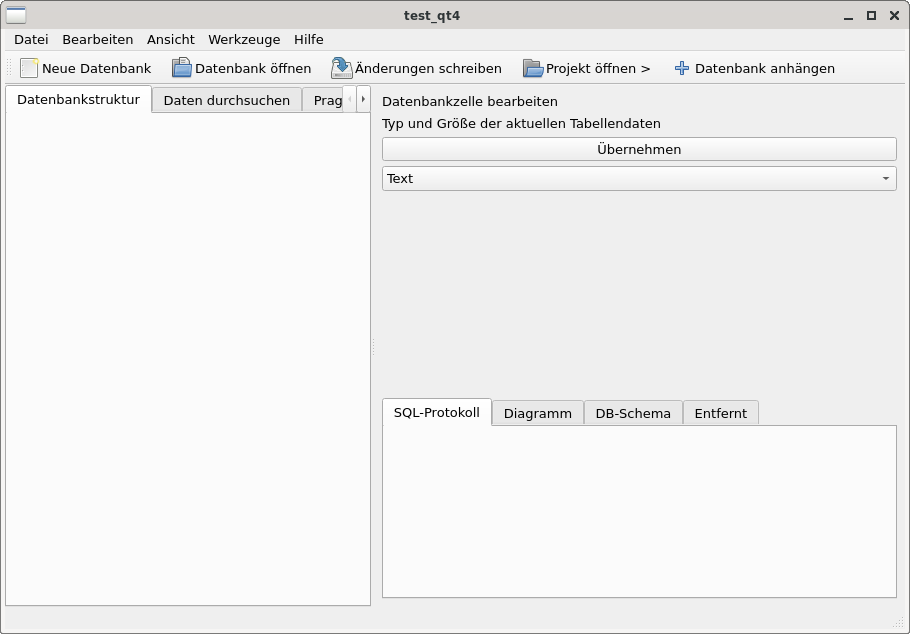
Renders perfectly. Same Qt5, same style, same plugins, same font.
Reading the source
Desperation. What do sqlitebrowser and QElectroTech do that conjure these
demons of graphical unpleasantness? I was in way too deep anyway, so I cloned
the sqlitebrowser source and dug through the setup code. With a freshly
sharpened delete-key, I set to work, slicing off code block after code block to
hopefully reveal which piece triggered the weird behavior. And finally,
FINALLY, I found the smoking gun. Here it is, in main.cpp:
QApplication::setAttribute(Qt::AA_EnableHighDpiScaling, true);
QApplication::setHighDpiScaleFactorRoundingPolicy(
    Qt::HighDpiScaleFactorRoundingPolicy::PassThrough);
QApplication::setAttribute(Qt::AA_UseHighDpiPixmaps, true);
For whatever reason, these innocent-looking lines make the GUI look like it put on shrunken laundry. Now the next step was trying to understand why.
AA_EnableHighDpiScaling tells Qt to automatically compute a scale factor from
the monitor’s reported DPI. PassThrough tells it to use the exact fractional
value instead of rounding to the nearest integer. That’s… reasonable, I
guess? I have a regular plain old 96 DPI monitor, no fractional scaling, so why
would that hurt? And still, applications like SimulIDE and my test programs,
that do not set these attributes, work correctly. Searching the web was
inconclusive, but I found an environment variable mentioned:
QT_ENABLE_HIGHDPI_SCALING=0 sqlitebrowser
Fixed.
Completely. It just works.
To be honest, at this point that gave me more questions than answers, but who am
I to complain. If I have to set this in my .bashrc, it wouldn’t be the
dirtiest hack in that file, so… fine by me, I guess.
QElectroTech fights back
Same environment variable for QElectroTech: no change. Still clipping, still
canvas artifacts. Calling strings on the binary reveals
QT_ENABLE_HIGHDPI_SCALING. Does that mean QElectroTech is handling this
internally, likely overriding whatever value I set from the outside?
QElectroTech also printed some interesting debug output on startup:
*** Qt screens ***
( 1 : 1919 x 1200 )
( 2 : 1919 x 1200 )
( 3 : 1919 x 1200 )
1919, not 1920. A weird off-by-one, probably confusing the maximum X coordinate (0-1919) with the pixel count. Not directly responsible for the clipping, but a hint that yes, QElectroTech has its own screen geometry handling.
The fix required a heavier hammer. QT_SCREEN_SCALE_FACTORS forces per-screen
scale factors, overriding whatever the application computes internally:
QT_AUTO_SCREEN_SCALE_FACTOR=0 \
QT_ENABLE_HIGHDPI_SCALING=0 \
QT_SCREEN_SCALE_FACTORS="1;1;1" \
qelectrotech
Both the clipping and the canvas artifacts vanished. The rendering glitches on the drawing canvas were not a separate bug at all; they were caused by the fractional scale factor introducing rounding errors in paint coordinates.
94 DPI
So Qt is computing a wrong scale factor from my monitors. What DPI do they
actually report? xdpyinfo says 96 by 96 dots per inch. But Qt apparently does
not read xdpyinfo; it reads the physical dimensions from the monitor’s EDID
data via Xrandr, and computes DPI from there. I am no stranger to Xrandr, I
have written a couple of scripts to turn monitors on and off and change
resolution in the past, usually with the help of
ARandR. But now, for the first
time with this setup, I actually read the output:
$ xrandr --query | grep " connected"
DP-0 connected 1920x1200+0+0 518mm x 324mm
DP-2 connected 1920x1200+1920+0 520mm x 320mm
DP-4 connected 1920x1200+3840+0 520mm x 320mm
Three “identical” monitors, two different physical dimensions. And it turns out, the first monitor is actually 1920 pixels / 518 mm * 25.4 mm/inch ≈ 94.15 by 1200 pixels / 324 mm * 25.4 mm/inch ≈ 94.07 DPI, and the other two 93.78 by 95.25 DPI. Scale factor: 94.15 / 96 ≈ 0.98. Not enough to be noticeable when rendering a ruler, but apparently enough to cause A LOT of trouble when rendering UI elements.
With PassThrough rounding, Qt uses 0.98 as the device pixel ratio. Every
widget, every scrollbar, every button is rendered at 98% of its intended size.
That two percent compounds across nested layouts until buttons lose their
borders, descenders get clipped, and scrollbars shrink to half their expected
width.
I am 98% certain that no user ever wanted their UI scaled to 98%. But that’s
what PassThrough does.
The fix
Two environment variables in ~/.xprofile:
export QT_ENABLE_HIGHDPI_SCALING=0
export QT_SCREEN_SCALE_FACTORS="1;1;1"
The first one handles well-behaved applications like sqlitebrowser that respect the environment variable. The second one handles applications like QElectroTech that override it internally.
Alternatively, you can fix this at the X level by telling the system to report 96 DPI regardless of what the monitors claim:
xrandr --dpi 96
Or by setting Xft.dpi explicitly in ~/.Xresources:
Xft.dpi: 96
The root cause here is arguably a Qt bug: PassThrough should clamp the scale
factor to a minimum of 1.0, because scaling a desktop UI down is very, very
unlikely to be the intended behavior. This is worth keeping in mind for Qt 6,
where PassThrough is the default rounding policy.
Oh, that’s why…
A while ago I dabbled with HTML5 and drawing on a canvas. It’s a nice little
project that I might present one day on this blog. In the meantime, remaining
silent about what exactly that project was, I can recount the story of me
discovering window.devicePixelRatio:
If I drew a point at the coordinates I got from a mouse click event, the
position would be off. Not by much, only a little, roughly 2%. And no matter
what I did, images always looked a bit smeared-out, as if interpolated. I
learned that I had to multiply values by window.devicePixelRatio.
Everything worked, I dismissed that as a quirk of JavaScript, because, well,
JavaScript, and thought no further of it. And now I know: My browser was just
relaying the 94.15 DPI faithfully. But no more. Ever since I fixed the issue:
console.log(window.devicePixelRatio)
1
So. D-P-Why was sqlitebrowser broken? Turns out my config-file archeology was in vain after all (albeit a bit of tidying up certainly didn’t hurt either). It was my monitors being about 10 millimeters too wide. So much for size not mattering.